In this article12 sections
- 01In 30 seconds
- 02How many Indian children have their own phone?
- 03How do I control my child's phone with Family Link?
- 04Can I control my child's iPhone from my phone?
- 05How do I limit YouTube for my teenager?
- 06How much screen time should a teenager have?
- 07What house rules does the IAP recommend?
- 08Which control does what?
- 09Can my child get around parental controls?
- 10How do I talk to my teen about phone limits?
- 11Where does bloc fit?
- 12When should I get help?
To control your child's phone usage, use the free controls already on the phone and back them with house rules everyone keeps. On Android, Google Family Link sets a daily limit, a night schedule and per app limits from your own phone; on iPhone, Screen Time with Family Sharing does the same. Then agree the rules no app can enforce: no phones at meals or in bedrooms, screens off an hour before bed, and a parent who follows them too.
This guide is for parents of children roughly 8 to 17 who have, or mostly use, their own phone. If your child is younger and the fight is about tantrums and meals, read how to get your child off the phone first.
In 30 seconds
- ·Android: Google Family Link. Free. Daily limit, Downtime, School time, app limits, app approval.
- ·iPhone: Screen Time through Family Sharing. Free. Downtime and App Limits, with a passcode only you know.
- ·YouTube: a supervised teen account gets a Shorts limit that can't be dismissed.
- ·House rules from the Indian Academy of Pediatrics (IAP): no phones in bedrooms or at the dining table, screens off an hour before bed.
- ·Every control has gaps. Tell your child what you have set and why.
How many Indian children have their own phone?
In rural India, 27 to 38 percent of 14 to 16 year olds who can use a smartphone own one, and more use it for social media than for study. The survey is rural only, not the full picture.
ASER 2024 covered 6,49,491 children in 605 rural districts. It found that 82.2 percent of rural children aged 14 to 16 can use a smartphone. Of those, 57 percent had used it for an educational activity in the reference week and 76 percent for social media.
Most rural teens can use a smartphone, and more use it for social media than for study
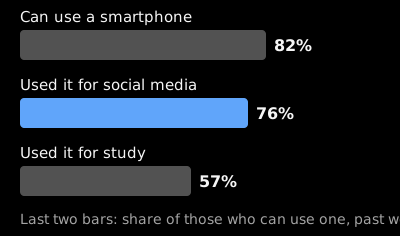
Source: ASER 2024 via ThePrint, January 2025
Ownership rises with age. Among those who could use a smartphone, 27 percent of 14 year olds and 37.8 percent of 16 year olds owned one. Ownership also differed by sex: 36.2 percent of boys against 26.9 percent of girls.
How do I control my child's phone with Family Link?
Install Google Family Link, link your child's Google Account and Android phone, and set four things: a daily limit, Downtime, School time and app limits. It is free and you manage it from your own phone.
Schedules need Android 7 or later on the child's device. Menu names can shift between versions, so follow what your screen shows.
- ·Set up supervision. Open the Family Link app on your phone and follow Google's steps to add your child's account and device.
- ·Set a daily limit. Choose your child, then set the hours for each day. Google lets you pick a single day or "Apply to all days of the week", so school days and Sundays can differ. The limit applies to each Android device or Chromebook your child uses, not to all of them added together.
- ·Add Downtime for the night. Go to Screen time, then Schedules. During Downtime, "Calls are always available"; for texting, set the messages app as an unlimited app.
- ·Add School time. It silences notifications while your child can still call and text.
- ·Limit single apps. You can "set individual app time limits, and unlimited time for educational or regularly used apps. You can block apps, too". One gap: "You can't place app time limits on system apps".
- ·Approve new apps. Family Link can require approval for new apps, so a new game is a conversation first.
- ·Use the exceptions. For a long train journey, give bonus time for the day without changing the schedule, or switch the limit off for one day. You can also tap Lock or Unlock under the device name; a locked device can still answer calls, and otherwise runs only the apps you marked as unlimited.
Can I control my child's iPhone from my phone?
Yes, if your child is in your Family Sharing group. Apple says the family organizer or a parent or guardian must set the child's Screen Time passcode on their own device.
The two settings that matter most are Downtime, a window when only calls and the apps you allow still work, and App Limits, a daily cap on an app or a category. Our iPhone screen time guide walks through both.
The passcode is the lock. If your child has watched you type it, change it. Apple also notes that in some places, settings like Screen Time can't be turned off on a child's account.
How do I limit YouTube for my teenager?
Put your teen on a supervised account, where the Shorts limit actually holds. On a regular adult account the Shorts feed limit is a reminder you can dismiss; for supervised teen accounts the limit is strict and cannot be dismissed.
Since April 2026 YouTube's list of limits includes "the option to set your Shorts feed limit to zero". Search, subscriptions and long videos, which is where the tuition channels are, keep working. The rollout was phased, so your menu may look different.
How much screen time should a teenager have?
There is no fixed number for ages 10 to 18. The IAP's 2022 guidelines say screen time should be "appropriately reduced" if it compromises other activities, and that adolescents need 8 to 9 hours of night sleep and at least one hour of outdoor play.
For ages 5 to 10, the IAP is firmer: "Limit screen time to less than 2 hours per day; the lesser, the better". It also says a child of this age should not get an independent phone, tablet or laptop, and that parents should not permit social media except for school, sports or other activity assignments. So for an 8 or 9 year old, the first control is whose phone it is. The full chart is in screen time for kids by age.
What house rules does the IAP recommend?
A family media plan with a few rules that apply to everyone, parents included. These come straight from the IAP guidelines:
- ·"Screens should be switched off 1 hour before bedtime."
- ·"Mark digital free zones like bedroom, dining table, kitchen, bathroom."
- ·A digital fasting time when nobody in the family uses a device.
- ·A family media usage plan that you formulate together.
- ·Monitor social media use by adolescents for privacy, cybersecurity and cyberbullying. The IAP says parents "should have passwords and ability to access all online accounts at any time".
- ·Co-view and monitor what children aged 5 to 10 watch.
The free family audit adds up everyone's hours, which is a fair place to start the plan.
Which control does what?
Family Link and Screen Time set limits on the phone itself, the YouTube setting covers Shorts, and house rules cover what no setting can.
| Option | What it does | Cost | What it can't do |
|---|---|---|---|
| Google Family Link | Daily limit, Downtime, School time, app limits and blocks, app approval, lock from your phone | Free | Limit system apps; stop calls in Downtime; cover other devices |
| iPhone Screen Time with Family Sharing | Downtime and App Limits behind a passcode you set | Free, built in | Hold once your child knows the passcode |
| YouTube supervised teen account | A Shorts limit that can't be dismissed | Free | Limit other apps |
| IAP house rules | Phone free bedrooms, meals and the hour before bed, for the whole family | Free | Enforce themselves |
| bloc | Blocks the apps each person picks, on a schedule they set; unblocking early means a walk to the fridge | ₹1,999, pay once | Lock a child's phone or control it remotely. It is not a parental control |
Can my child get around parental controls?
Sometimes. Controls slow a child down; they don't replace knowing what your child does online.
The gaps, from the makers' own pages:
- ·Other devices. Family Link limits are per device. A second phone, a friend's phone or the family laptop is not covered.
- ·System apps and calls. System apps can't be time limited, and calls stay available in Downtime.
- ·The passcode. On iPhone, everything sits behind one code.
- ·Age. Google says "Children over the applicable age can manage their own account". Supervision is not forever.
- ·Location. Family Link shows children on a map only "as long as they're carrying their device".
Don't set controls in secret. A teen who finds hidden monitoring may learn to hide better.
How do I talk to my teen about phone limits?
Start with what you both want, usually sleep and marks, and let your teen choose some of the rules. A rule they helped write is easier for them to keep.
- ·Open with numbers, not blame. Look at the week's screen time together, yours too.
- ·Ask which apps cost them the most. Most teens know. The phone addiction quiz can open the conversation.
- ·Agree the non-negotiables: sleep, the hour before bed, the dining table.
- ·Say what you can see in Family Link or Screen Time, and why.
- ·Trade limits for trust. Loosen a limit when exams go well; review it every few months.
- ·Keep the rules yourself. A parent scrolling at dinner ends the discussion.
Where does bloc fit?
bloc is not a parental control. It can't lock a child's phone and you can't manage anyone's phone remotely with it. It fits a different job: a rule an older child or teen has agreed to, kept by the whole family.
bloc is a small magnetic NFC device that sits on the fridge, with a free app for iPhone and Android and bloc for Chrome for websites. Each person picks the apps that eat their evenings, and the apps get blocked on their own, on a schedule (say 9 pm to 7 am) or from a session started in the app. A blocked app shows a shield screen with a limited peek.
To unblock early, you walk to the fridge and tap your phone on the bloc. The tap only unblocks. That walk is friction, not a lock: anyone can make it, but it happens in the kitchen, in front of the family.
Several phones can pair with one bloc, so the whole family, parents too, can use the same bloc with their own schedules, and Bloc Score shows each person how their own blocks are going. See how bloc works.
When should I get help?
Talk to your paediatrician if your child gets very angry or aggressive without the phone, if sleep, studies or friendships are clearly suffering, or if steady rules have not helped. In Bengaluru, NIMHANS runs the SHUT clinic (Service for Healthy Use of Technology), which works with technology overuse and sees children as well as adults.
Sources
- ·Google Family Link Help, "Manage your child's screen time"
- ·Google Family Link Help, "Set a schedule on your child's device"
- ·Google Family Link, product page
- ·Apple Support, Screen Time passcode on a child's device
- ·YouTube Help, "Set a Shorts feed limit"
- ·MediaNama, YouTube option to turn off Shorts expands time controls, April 2026
- ·ThePrint on ASER 2024, smartphone use among rural children aged 14 to 16, January 2025
- ·Indian Academy of Pediatrics, Guidelines on Screen Time and Digital Wellness in Infants, Children and Adolescents, Indian Pediatrics, March 2022
- ·South First, NIMHANS launches a helpline for digital detox, November 2022
bloc is our product. We make and sell it, so read anything this article says about bloc as the maker's view. Every other claim links to its source.
Spot a mistake? Email support@letsbloc.com. We check it, fix it and update the date above.
Founder of bloc. IIT Kharagpur. Formerly a senior product analyst at BharatPe. Builds bloc full time from Bir, Himachal.
Free tools from bloc
Frequently asked questions
How to control child phone usage?
Use the free controls built into the phone and back them with a few house rules. On Android, Google Family Link sets a daily limit, a night Downtime and per app limits. On iPhone, Screen Time with Family Sharing does the same. Then agree rules as a family: no phones at meals or in bedrooms, and screens off an hour before bed.
How to control child phone using Family Link?
Link your child's Google Account and Android phone in the Family Link app, then set a daily limit for each day of the week, a Downtime schedule for night, a School time schedule for class hours, and time limits or blocks on single apps. You can also require your approval for new apps and lock the device from your own phone.
How to control child phone on Android?
Google Family Link is the free option made for this. It needs Android 7 or later on the child's device for schedules. Daily limits apply to each Android device or Chromebook separately, calls stay available during Downtime, and system apps can't be given time limits.
Can I control my child's iPhone from my phone?
Yes, if your child is in your Family Sharing group. Apple says the family organizer or a parent or guardian sets the child's Screen Time passcode on their own device. From there you can set Downtime and App Limits. Keep the passcode to yourself, because anyone who knows it can change the settings.
How to stop child phone addiction?
Start with sleep and routine, not punishment: phones out of the bedroom at night, screens off an hour before bed, an hour outdoors every day, and limits you set together. If your child gets very angry without the phone, or sleep, studies or friendships are suffering, talk to your paediatrician. NIMHANS in Bengaluru runs the SHUT clinic for technology overuse.
Can my child get around parental controls?
Sometimes. Limits apply per device, so a second phone, a friend's phone or the family laptop is not covered. A passcode a child has seen you type is no longer a lock. And older children can, past an age Google sets, manage their own Google Account. Controls buy you time; the agreement with your child is what lasts.
Ready to stop doomscrolling for good?
Try bloc, the device that actually keeps you off your phone
One-time purchase · Free shipping across India · 30 day replacement guarantee
Order bloc, from ₹1,999