In this article8 sections
- 01In 30 seconds
- 02How do I block Instagram on my Android phone?
- 03How to block Instagram in Play Store?
- 04How do I block Instagram on my child's Android phone?
- 05Which way of blocking Instagram on Android is best?
- 06Can I block only Reels?
- 07Why does my Instagram block keep failing?
- 08What if I keep unblocking Instagram anyway?
To block Instagram in an Android phone, open Settings, tap Digital Wellbeing, tap App timers, then tap Set timer next to Instagram and choose a short daily limit. When the time runs out, the app closes and its icon dims until midnight. For a firmer block, schedule Focus mode with Instagram paused, set the timer to zero behind an App limits PIN that someone else keeps, or, on a child's phone, switch Instagram to Blocked in the Family Link app.
Disclosure: this guide is written by the team that makes bloc, a small magnetic NFC device that sits on your fridge, with a free app for iPhone and Android, plus bloc for Chrome. We checked each help page in November 2026. Menus change between Android versions and phone brands, so check yours.
In 30 seconds
- ·Your own phone, free. App timer or scheduled Focus mode in Digital Wellbeing.
- ·Firmer, still free. A zero-minute timer behind a PIN that someone else types.
- ·A child's phone. Family Link: App limits, Instagram, Blocked.
- ·Play Store. It can uninstall Instagram. It has no block switch for one app.
- ·The catch. How far away the undo is decides whether a block holds.
How do I block Instagram on my Android phone?
Use Digital Wellbeing in Settings. There are three levels: a daily timer, a scheduled pause, and a zero-minute timer behind a PIN.
Google's help page says "Some of these steps may vary based on your device." Phone brands may name or place these menus differently. If you can't find one, search Settings for "Digital Wellbeing". Bedtime mode and notification settings are covered in how to reduce screen time on Android.
Level 1: app timer (a daily cap)
- ·Open Settings.
- ·Tap Digital Wellbeing, then App timers.
- ·Next to Instagram, tap Set timer.
- ·Choose how much time you get per day and tap OK.
In Google's words, "When you run out of time, the app closes and its icon dims." Timers reset at midnight.
Level 2: Focus mode (blocked for set hours)
- ·Open Settings, tap Digital Wellbeing, then Focus mode.
- ·Choose Instagram as an app to pause. Google says that when Focus mode is on, "you can't use these apps and won't get notifications from them."
- ·Tap Set a schedule so it turns on by itself, for example during study hours.
Level 3: zero-minute timer behind a PIN
Google's page includes this tip: "To block another user's access to an app on a device, create an App limits PIN and set the time limit for the app to zero." You can use it on yourself.
- ·Open Settings, tap Digital Wellbeing, then App limits, then App limits PIN.
- ·Turn on PIN for app time limits and unlock the phone when asked.
- ·Hand the phone to someone you trust and let them enter the 4-digit PIN.
- ·Set Instagram's timer to zero.
Now the block can only be changed with a PIN you don't know. If your phone doesn't show App limits PIN, levels 1 and 2 still work.
How to block Instagram in Play Store?
You can't block one named app from the Play Store on an adult's account. The Play Store offers two things: uninstalling Instagram, and content restrictions that filter apps by rating.
To uninstall from the Play Store, Google's steps are:
- ·Open the Google Play Store app.
- ·At the top right, tap the Profile icon.
- ·Tap Manage apps & devices, then Manage.
- ·Select Instagram.
- ·Tap Uninstall.
To get it back, find it under Manage and tap Install. If Instagram came with your phone and has no Uninstall button, Google says that on some phones preinstalled apps can be turned off, and to ask the phone's maker how.
Content restrictions filter apps by rating behind a PIN. Google's steps: open the Play app, tap your profile icon, then Settings, Family, Content restrictions, Go to Parental controls, set up a parental controls PIN ("Create a PIN your child doesn't know"), and choose the highest content rating you want to allow.
Google's caveats:
- ·You will "still be able to see any apps and games you downloaded before you added content restrictions".
- ·"Content restrictions don't prevent restricted content as a search result or through a direct link."
So it is a filter, not a block. For a child, use Family Link.
How do I block Instagram on my child's Android phone?
Use Google's free Family Link app. If your child's Google Account is supervised, you can switch Instagram to Blocked from your own phone.
Steps from Google's Family Link help:
- ·Open the Family Link app.
- ·Select your child.
- ·Tap Screen time, then Time limits, then App limits.
- ·Select Instagram.
- ·Tap the Allowed toggle.
- ·Tap Done.
Google says the app "will be blocked or unblocked in about 5 minutes, or once the device is connected to the internet." If your child is using it at that moment, "they'll get a 1 minute warning to finish up before the app is blocked." It should be blocked on all of your child's Android devices or Chromebooks. On the same screen, Set limit gives a daily allowance instead of a full block.
One gap to close: the block covers the app, not instagram.com in a browser. Add the site to Family Link's Blocked sites; the steps are in how to block Instagram website on Chrome.
If your teenager keeps Instagram, use Instagram's own settings. Meta's Teen Accounts announcement for India (11 February 2025) lists two defaults: a notification "prompting them to exit the app after 60 minutes of daily usage", and sleep mode "from 10 PM to 7 AM", which mutes notifications.
With supervision switched on, Meta says that once the parent's daily limit is reached, "the teen will no longer be able to access Instagram", and that parents can "restrict Instagram access at night or during designated times". One limit: Instagram's help page says supervision is optional, both must agree, and either can remove it at any time, with the other notified.
If your child seems distressed or withdrawn beyond ordinary phone arguments, speak to a doctor or counsellor; an app block is not treatment. More in how to get your child off the phone.
Which way of blocking Instagram on Android is best?
For yourself, start with scheduled Focus mode, and move to the PIN method if you keep undoing it. For a child, use Family Link.
| Method | Free? | What it does | How it is undone |
|---|---|---|---|
| Digital Wellbeing app timer | Free, built in | Closes Instagram after your daily limit | Delete the timer |
| Focus mode | Free, built in | Pauses Instagram for set hours | Tap Take a break, or turn it off |
| Zero timer with App limits PIN | Free, built in | Blocks Instagram all day | Enter the PIN (ask the person who set it) |
| Instagram Daily limit | Free, in the app | Reminds you | Nothing to undo. It is a reminder |
| Instagram Sleep mode | Free, in the app | Pauses notifications at night | Nothing to undo. It is not a block |
| Uninstall or disable | Free | Removes the app from the phone | Reinstall from the Play Store |
| Family Link block | Free | Blocks the app on a child's supervised account | The parent switches it back in Family Link |
| Instagram supervision (Teen Accounts) | Free | Parent's daily limit and blocked hours for a teen | Parent changes it; parent or teen can remove supervision |
| AppBlock, ScreenZen and similar apps | Free to install; AppBlock also has a paid version | Schedules, pauses or locks set in the blocker | Depends on the app: wait, meet a condition, or uninstall the blocker |
| bloc | ₹1,699, pay once; app is free | Blocks on a schedule or in a session | Walk to the fridge and tap your phone on the bloc |
Notes on three rows:
- ·Instagram Daily limit. Instagram's help page calls it "a reminder for longer periods of time added up during the day".
- ·Sleep mode. Instagram says it "lets you automatically pause Instagram notifications every night". The page describes no block on opening the app.
- ·Third-party blockers. AppBlock offers schedules ("Customize blocks by time or location") and a Strict Mode to "Lock your blockings", with free and paid versions. ScreenZen's Play Store listing says "Take a moment before launching a distracting app".
How each Instagram block is undone
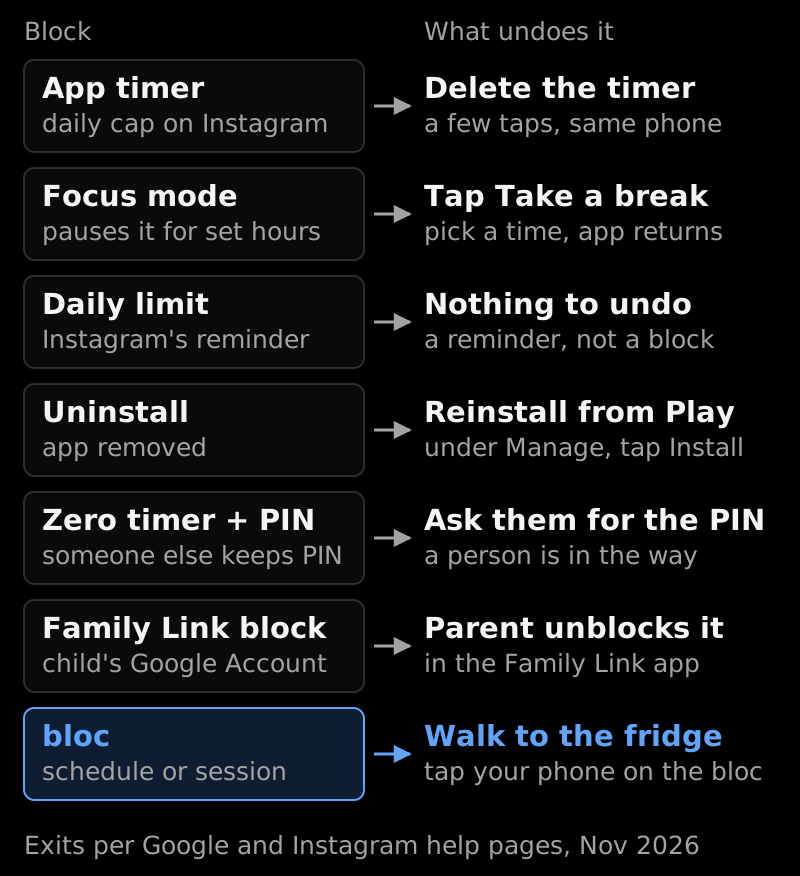
Source: Google's Digital Wellbeing, Google Play and Family Link help pages and Instagram's Daily limit help page, checked November 2026.
Can I block only Reels?
Not from Instagram's settings, as far as we could find. None of the Instagram help pages we checked offers a switch that turns Reels off while leaving messages and posts.
The practical route is to block the whole app during the hours Reels cost you most. If you're unsure Instagram is your worst app, try the free App Toxicity Ranker. More options are in how to stop Reels addiction.
Why does my Instagram block keep failing?
Because the undo is on the same phone, a few taps away. The four usual exits:
- ·You delete the timer. Google's own instruction for using the app before midnight is to "delete the app timer".
- ·You tap Take a break. Focus mode offers it to "temporarily unpause apps".
- ·You reinstall. The Play Store lists the app under Manage with an Install button.
- ·You open the website. An app block does nothing to instagram.com in Chrome.
The fix is an undo that costs more than a tap: a PIN someone else holds, or an unblock that lives away from your hand. Every method, ranked by how hard it is to undo, is in how to block apps so you can't unblock them.
What if I keep unblocking Instagram anyway?
Move the unblock off your phone. If the free methods hold for you, stop there; bloc is for when you keep undoing them.
bloc (by Letsbloc) is a small magnetic NFC device that sits on your fridge, with a free app for iPhone and Android, plus bloc for Chrome for websites. In the app you choose Instagram, and it gets blocked on its own: on a schedule you set, or from a session you start in the app. Open Instagram during a block and you see a shield screen with a limited peek.
To unblock early, you walk to the fridge and tap your phone on the bloc. The tap only unblocks. Blocking runs by itself.
Bloc Score shows how your blocks are going, several phones can pair with one bloc, and bloc for Chrome covers instagram.com on your laptop.
Two honest limits. A determined person can get around bloc, as with any software. And it is not a parental lock: anyone who walks to the fridge and taps can unblock. For a younger child, Family Link is the right tool. A bloc costs ₹1,699, pay once. See how bloc works.
Sources
All pages checked in November 2026.
- ·Google Android Help, "Manage how you spend time on your Android phone with Digital Wellbeing"
- ·Google Play Help, "Delete apps on your Android device"
- ·Google Play Help, "Reinstall & re-enable apps"
- ·Google Android Help, "Disable apps that came with your Android device"
- ·Google Play Help, "How to set up content restrictions on Google Play"
- ·Google For Families Help, "Manage your child's Google Play apps"
- ·Meta, "Introducing Teen Accounts in India on Instagram", 11 February 2025
- ·Instagram Help Centre, about supervision on Instagram
- ·Instagram Help Centre, setting a daily time limit reminder
- ·Instagram Help Centre, sleep mode
- ·AppBlock for Android
- ·Google Play, "ScreenZen: Screen Time Control"
bloc sits on your fridge. Instagram blocks on a schedule, and unblocking it early takes a walk. Starts at ₹1,699. See bloc →
bloc is our product. We make and sell it, so read anything this article says about bloc as the maker's view. Every other claim links to its source.
Spot a mistake? Email support@letsbloc.com. We check it, fix it and update the date above.
Founder of bloc. IIT Kharagpur. Formerly a senior product analyst at BharatPe. Builds bloc full time from Bir, Himachal.
Free tools from bloc
Frequently asked questions
How to block Instagram in Android phone?
Open Settings, tap Digital Wellbeing, tap App timers, tap Set timer next to Instagram and choose a short daily limit. When the time runs out the app closes and its icon dims until midnight. For a firmer block, schedule Focus mode with Instagram paused, or set the timer to zero behind an App limits PIN that someone else keeps.
How to block Instagram in mobile?
On an Android mobile, use Digital Wellbeing: an app timer, or Focus mode on a schedule. On a child's mobile, use the Family Link app and switch Instagram from Allowed to Blocked under App limits. Blocking the app does not block instagram.com in the browser, so block the website too.
How to block Instagram in Play Store?
The Play Store cannot block one named app for an adult. Its content restrictions filter apps by rating behind a PIN, and Google says apps you downloaded earlier stay visible and a direct link still works. You can uninstall Instagram from the Play Store under Manage apps and devices, and for a child you block it in Family Link.
How do I block Instagram on my child's Android phone?
Open the Family Link app, select your child, tap Screen time, then Time limits, then App limits. Select Instagram, tap the Allowed toggle and tap Done. Google says the app is blocked in about 5 minutes or once the device is online, and should be blocked on all of your child's Android devices or Chromebooks.
Can I block Instagram for a few hours only?
Yes. In Digital Wellbeing, open Focus mode, choose Instagram as an app to pause and tap Set a schedule so it turns on by itself at the hours you pick. While Focus mode is on you can't use the app or get its notifications. The Take a break button brings it back, which is the weak point.
Does Instagram's own Daily limit block the app?
No. Instagram's help page describes the daily time limit as a reminder for time added up during the day. Sleep mode is described as pausing notifications at night, not as a block. Only a supervising parent's daily limit on a teen's account stops access once it is reached.
Ready to stop doomscrolling for good?
Try bloc, the device that actually keeps you off your phone
One-time purchase · Free shipping across India · 30 day replacement guarantee
Order bloc, from ₹1,699