In this article9 sections
- 01In 30 seconds
- 02Why do I keep unblocking my own apps?
- 03Which method is hardest to undo?
- 04How do I block apps on Android so I can't unblock them?
- 05How do I lock apps on iPhone so I can't open them?
- 06Can I stop myself uninstalling an app blocker?
- 07Is there an app blocker you can't bypass?
- 08What if the unblock lives somewhere other than my phone?
- 09Which method should I use?
You can't block an app so that you can never unblock it from the phone itself, because the same phone has Settings, an uninstall button and the passcode you typed. The closest you get is a lock whose key you don't hold: a passcode someone else keeps, a strict mode that only opens when a condition is met, or an unblock that lives somewhere other than your hand. Below, every method is ranked from easiest to undo to hardest, free ones first.
Disclosure: this guide is written by the team that makes bloc, a ₹1,699 magnetic NFC device for your fridge with a free app for iPhone and Android. We checked each app's own help page or a current guide in November 2026. Menus change between versions, so check yours.
In 30 seconds
- ·The rule. A block holds only as long as undoing it costs more than you are willing to pay at 11 pm.
- ·Free and strongest. A Screen Time passcode or Android app limits PIN that someone else sets and keeps.
- ·Strict apps. AppBlock's Strict Mode on Android, Opal's Deep Focus on iPhone. Both make undoing slow, not impossible.
- ·Distance. Put the unblock in another room.
Why do I keep unblocking my own apps?
Because the block and the way out sit on the same screen. If the exit is one tap, a tired brain takes it.
Most built-in tools are designed to be easy to undo. Android's Digital Wellbeing tells you that to use an app again before midnight you delete the app timer. On iPhone, the App Limit screen offers "ignore for 15 minutes" and "ignore limit for today", as an iPhone user describes it on Apple's forum. Neither is broken. They are reminders, not locks. We wrote about why reminders fail at night in why willpower isn't enough to stop doomscrolling.
Which method is hardest to undo?
A passcode someone else keeps is the hardest free method. Strict modes come next, and an unblock you have to walk to sits beside them.
How hard each block is to undo
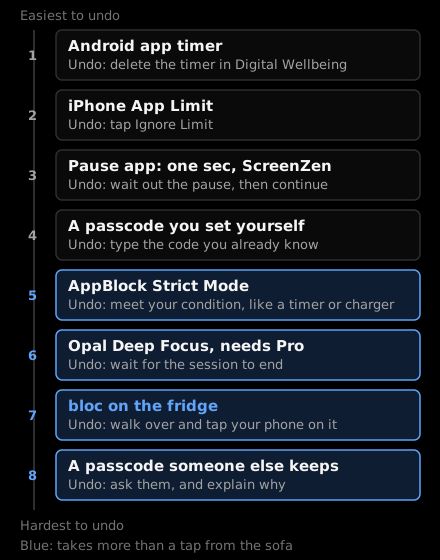
Our ranking, based on Android Help, Apple Community, AppBlock help and Opal's App Store listing. The bloc rung is how bloc works.
| Method | Free? | How you undo it | How hard to undo |
|---|---|---|---|
| Android app timer | Free, built in | Delete the timer | Very easy |
| Focus mode (Android) | Free, built in | Tap Take a break | Very easy |
| iPhone App Limit | Free, built in | Tap Ignore Limit | Very easy |
| one sec or ScreenZen pause | Free (one sec for one app) | Wait, then continue | Easy |
| Passcode or PIN you set yourself | Free | Type it | Easy |
| AppBlock Strict Mode | Free up to 24 hours on Android | Meet your unlock condition or use the emergency unblock | Hard |
| Opal Deep Focus | Needs Opal Pro | Wait for the session to end | Hard |
| bloc on the fridge | ₹1,699, pay once | Walk over and tap your phone on the bloc | Hard, and it takes a walk |
| Passcode someone else keeps | Free | Ask them | Hardest |
How do I block apps on Android so I can't unblock them?
Use Digital Wellbeing app timers with an app limits PIN that someone else sets. For a block you can't talk your way out of at all, add AppBlock's Strict Mode.
About 95 percent of phones in India run Android (StatCounter, October 2026), so start here. Indians spent about 1.1 trillion hours on smartphones in 2024, according to EY, and the Economic Survey 2025-26 encouraged families to adopt "structured screen-time limits". The trick is making those limits stick.
Free, built in:
- ·Open Settings, then Digital Wellbeing (the exact menu name varies by phone brand).
- ·Under App timers, next to the app you want to limit, tap Set timer. When time runs out, the app closes and its icon dims.
- ·Set up the app limits PIN. Google asks you to enter a unique four-digit PIN to be used for app time limits. Hand the phone to a friend or someone in your family and let them type it. Google's own note is "do not share it with others"; here that is the point.
- ·Skip Focus mode for the apps that beat you. It has a Take a break button that unpauses apps for a time you choose.
Full steps are in how to reduce screen time on Android.
Stricter, with AppBlock: Strict Mode locks your setup until you meet an unlock condition you chose: a PIN, a charger, a timer, a cooldown, following your schedule, or approval from a trusted contact. While it is on, AppBlock says "it prevents you from disabling AppBlock's permissions or turning off Accessibility", and it can block the Settings app directly. Pick a timer or charger condition, not a PIN you know. The free plan caps Strict Mode at 24 hours on Android.
How do I lock apps on iPhone so I can't open them?
Set an App Limit, turn on Block at End of Limit, stop apps being deleted, and let someone else hold the Screen Time passcode. All of it is free.
- ·Go to Settings, then Screen Time, and set a Screen Time passcode. Better: hand the phone to someone you trust and let them type a code you don't see.
- ·Set an App Limit on the apps you lose time to. On iOS 27 Apple's guide also describes Screen Time Schedules and Time Allowances, so the menu names on your phone may differ.
- ·Turn on Block at End of Limit. It only appears once you have set a Screen Time passcode. Without it, Ignore Limit is one tap.
- ·Stop yourself deleting the app (or the blocker): Content & Privacy Restrictions, then iTunes & App Store Purchases, then Deleting Apps, and set it to Don't Allow, per iPhone Life's guide. That setting sits behind the same passcode.
If you know the passcode, steps 3 and 4 are a few taps away, so the person who holds it is the real lock. Full Screen Time steps are in how to reduce screen time on iPhone.
Stricter, with Opal: Opal's Deep Focus "won't let you cancel or bypass at all", per its Indian App Store listing. It needs Opal Pro; the free tier still gives you three recurring Focus Sessions and unlimited sessions you start right away.
Can I stop myself uninstalling an app blocker?
Yes, on both platforms, but only with a lock you can't open yourself.
On Android, AppBlock's uninstall block works when Strict Mode has Disable AppBlock uninstalling and Block device settings turned on. ScreenZen's site says its lock mode closes common loopholes and it can prevent uninstalling. On iPhone, the Deleting Apps restriction in step 4 above covers every app, blockers included.
Is there an app blocker you can't bypass?
No. Every app blocker lives on the phone that can undo it, and the honest ones say so.
AppBlock's own help page has an emergency unblock: for Timer or Follow schedules conditions you retype a long text and wait a few minutes, with later requests getting harder. That is good design. It turns a two second escape into a few minutes of effort, which is exactly when the urge tends to pass.
There is evidence that effort works even when it is small. In a six week field experiment with 280 participants, published in PNAS in 2023, the pause app one sec decreased users' actual opening of target apps by 57 percent, and 36 percent of the time people tried to open a target app, they closed it again. The other side of that number: most of the time, people waited out the pause and opened the app. A pause helps. A walk helps more than a pause.
So stop looking for a block that can't be broken. Look for one where breaking it costs more than you want to pay.
What if the unblock lives somewhere other than my phone?
Then undoing it means getting up. That is the idea behind bloc.
bloc (by Letsbloc) is a small magnetic NFC device that sits on your fridge, with a free app for iPhone and Android and bloc for Chrome for websites. Apps block on their own, on a schedule you set or from a session you start in the app. Open a blocked app and you see a shield screen with a limited peek. To unblock early, you walk to the fridge and tap your phone on the bloc. The tap only unblocks; blocking runs by itself.
It is not a cage. Someone determined can still find a way around it, the same as with any software. What it does is move the unblock to a place across the room, which is a strong bit of friction at the moment you are most likely to give in. Bloc Score shows how your blocks are going, and several phones can pair with one bloc, so a flat or a family can share it. ₹1,699, pay once. See how bloc works.
Which method should I use?
- ·Free, tonight: set app timers (Android) or App Limits with Block at End of Limit (iPhone), and let someone else type the PIN or passcode.
- ·No one to hold the code: AppBlock's Strict Mode with a timer or charger condition on Android; Opal Deep Focus on iPhone if a subscription is fine.
- ·You keep deleting the blocker: turn on the uninstall block (AppBlock) or Deleting Apps set to Don't Allow (iPhone).
- ·The late night hours keep winning: move the unblock out of your hand, with a bloc on the fridge.
Not sure which apps deserve the strictest block? The App Toxicity Ranker helps you pick. For a side by side of the apps themselves, see best app to reduce screen time.
Sources
- ·Google Android Help, "Manage how you spend time on your Android phone with Digital Wellbeing"
- ·Apple iPhone User Guide, "Set schedules and limits in Screen Time on iPhone" (iOS 27)
- ·Apple Community thread on the Ignore Limit options
- ·iDownloadBlog, "Fix Screen Time App Limits not working at all in iOS 26", March 2026
- ·iPhone Life, "Why Can't I Delete Apps on My iPhone & iPad?", updated March 2025
- ·Bloomberg, "Indians Spend a Trillion Hours on Their Phones", March 2025, citing EY
- ·Outlook India on the Economic Survey 2025-26 and digital addiction, January 2026
- ·StatCounter, mobile OS market share India, October 2026
- ·AppBlock, Strict Mode and unblocking help and AppBlock pricing, free vs Premium
- ·Opal: Screen Time Control on the App Store (India) and Opal help centre, "Why pay for Opal?"
- ·ScreenZen site
- ·Grüning, Riedel and Lorenz-Spreen, "Directing smartphone use through the self-nudge app one sec", PNAS, 2023
bloc sits on your fridge. Apps block on a schedule. Unblocking takes a walk. Starts at ₹1,699. See bloc →
bloc is our product. We make and sell it, so read anything this article says about bloc as the maker's view. Every other claim links to its source.
Spot a mistake? Email support@letsbloc.com. We check it, fix it and update the date above.
Founder of bloc. IIT Kharagpur. Formerly a senior product analyst at BharatPe. Builds bloc full time from Bir, Himachal.
Free tools from bloc
Frequently asked questions
How do I block apps so I can't unblock them?
From the phone alone, you can't fully, because Settings, uninstalling or a passcode you know will always undo it. The closest you get is a lock whose key you don't hold: a Screen Time or app limits PIN that someone else sets and keeps, AppBlock's Strict Mode with an unlock condition like a timer or a charger, Opal's Deep Focus, or an unblock that lives across the room, like a bloc on the fridge.
How do I block apps on Android so I can't unblock them?
Free: set app timers in Digital Wellbeing and ask someone else to set the app limits PIN, so deleting the timer needs them. Stricter: AppBlock's Strict Mode can lock your setup until a timer runs out or you plug in a charger, and can block the Settings app and uninstalling. The free plan caps Strict Mode at 24 hours on Android.
How do I lock apps on iPhone so I can't open them?
Set an App Limit in Screen Time, turn on Block at End of Limit (it appears once a Screen Time passcode is set), then turn Deleting Apps to Don't Allow under Content & Privacy Restrictions. Let someone you trust type the passcode so you never learn it. On iOS 27 the menus also include Time Allowances and Screen Time Schedules, so names may differ on your phone.
Is there an app blocker you can't bypass?
No. Every app blocker runs on the phone that can turn it off, and its makers say so in their own help pages by offering emergency unlocks. The strict ones make a bypass slow and annoying rather than impossible, which is usually enough.
Can I stop myself uninstalling an app blocker?
On Android, AppBlock's Strict Mode has options to disable uninstalling AppBlock and to block device settings. On iPhone, Screen Time's Content & Privacy Restrictions can stop any app being deleted, as long as you don't know the Screen Time passcode.
Ready to stop doomscrolling for good?
Try bloc — the device that actually keeps you off your phone
One-time purchase · Free shipping across India · 30 day replacement guarantee
Order bloc, from ₹1,699