To reduce screen time on Android, open Settings, tap Digital Wellbeing, and check the dashboard to see which apps take your hours. Set app timers on your two or three worst apps, schedule Focus mode for work or study and Bedtime mode (with grayscale) for night, and cut notifications down to a few check-ins a day. Then add one thing Android cannot give you: a limit you cannot undo in two taps, because every setting above can be switched off from the same screen that tempts you.
How much time do Indians spend on their phones?
About 94 percent of phones in India run Android, so these settings are almost certainly already in yours.
The EY and FICCI media and entertainment report found that Indians spent 4.95 hours a day on phone apps in 2024, up 3.1 percent on the year before, and more than 1.1 trillion hours on digital platforms in total. Most of it was not work. Media, meaning social media, films, entertainment, music and casual games, took 69 percent of phone time. Business and communication took about 22 percent, and everything else about 9 percent.
Where Indians' phone time goes
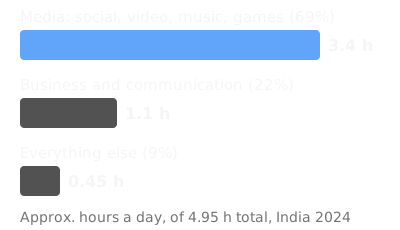
Source: EY and FICCI, 2025. Hours are approximate, worked out from 4.95 hours a day.
Where is Digital Wellbeing on my Android phone?
Open Settings and tap Digital Wellbeing. The first time, Google asks you to set up your profile. If you want it as an app icon, turn on "Show icon in the app list" inside its settings.
Not every phone has it. Google's help page says Digital Wellbeing is only on some phones and steps vary by device. Some brands put it under a different name, so if you do not see it, search Settings for "Digital Wellbeing" or "screen time".
How do I check my screen time on Android?
The dashboard is the first screen inside Digital Wellbeing. It shows a chart of today's screen time split by app, plus how many times you unlocked the phone, how many times you opened apps, and how many notifications you received.
Before changing anything, write down today's total screen time, unlocks, and top three apps. The free screen time calculator turns daily hours into days a year.
How do I set app timers on Android?
- ·Open Digital Wellbeing and tap App timers (or tap the app's name on the dashboard).
- ·Next to the app, tap Set timer and choose a daily limit.
- ·When the time runs out, the app closes and its icon dims for the rest of the day.
- ·Timers reset at midnight.
Set them on the two or three apps that top your dashboard, not on everything, and tighten over the week. Some work or school accounts might not work with app timers.
The catch: to use the app again before midnight, you delete the timer. A couple of taps, and the app opens as normal.
Digital Wellbeing does offer a PIN for app limits, for a device "that only you can change". It helps if someone else sets the PIN. If you set it yourself, you know it, and the exit is still a few taps away.
How do I use Focus mode on Android?
Focus mode pauses a set of apps at once, which suits exam prep or office hours.
- ·In Digital Wellbeing, tap Focus mode.
- ·Tick the apps to pause. When Focus mode is on, you cannot use these apps and you do not get their notifications.
- ·Tap Turn on now, or tap Set a schedule so it switches on at the same hours every day.
Use the schedule. If turning it on depends on you, it will happen on the good days and get skipped on the bad ones. For study, try 7 pm to 10 pm on weekdays.
Focus mode has its own exit, called Take a break: tap it, choose how long, and the paused apps come back. Handy when you need to reply to someone, and also where most Focus mode plans end.
How do I set up Bedtime mode on Android?
- ·In Digital Wellbeing, tap Bedtime mode, then Bedtime routine.
- ·Pick start and end times and which days, or choose Turn on while charging between set hours, so plugging the phone in at night starts it.
- ·Pick what it does. Google's options are Grayscale (a black and white screen), Do Not Disturb, keeping the always-on display dark, dimming the wallpaper, and a dark theme.
Turn on grayscale. Reels, Shorts and games are designed in colour, and a black and white feed is less appealing (the research is further down). Set the start time about an hour before you want to be asleep.
What should I do about notifications on Android?
You pick the phone up for one WhatsApp message and resurface twenty minutes later in Reels. Notifications are the trigger for a lot of screen time.
A two week field experiment with more than 200 people living in India, published in Computers in Human Behavior in 2019, tested three approaches against a control group. People whose notifications arrived three times a day, at 9 am, 3 pm and 9 pm, felt happier, more productive, less stressed and more attentive, and unlocked their phones fewer times than the control group. Hourly batching brought few benefits. And people with no notifications at all were no better off than the controls, felt more anxious, and did not unlock less.
Three ways to handle notifications, from a two week experiment in India
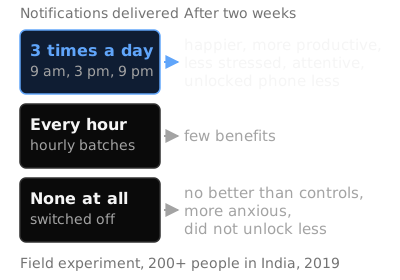
Source: Fitz, Kushlev, Jagannathan, Lewis, Paliwal and Ariely, 2019, more than 200 participants in India over two weeks.
So the lesson is not "switch everything off". It is "check in a few times a day, on purpose". Android has no three-times-a-day batching switch, but you can get close: turn off notifications for every app that is not a person talking to you (likes, uploads, offers and game rewards all go), and pick three check-in times for the rest. The free notification audit helps you sort which ones to keep.
Why do Digital Wellbeing settings stop working?
Each tool above has a built-in exit, and the exit is on the same screen as the temptation.
Each Digital Wellbeing tool, and what it takes to get around it
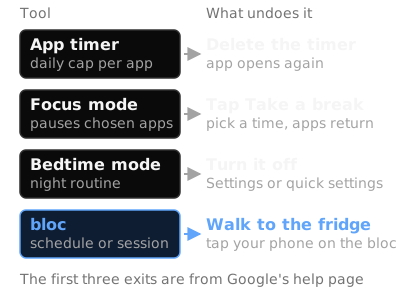
Source: the first three exits are from Google's Digital Wellbeing help page. The bloc step is described below.
None of these exits takes more than a few seconds, and all of them happen while you are holding the phone, looking at the thing you want to open, usually tired.
This is not a reason to skip the settings. Allcott, Gentzkow and Song, in the American Economic Review in 2022, found that letting people set limits on their future screen time substantially reduces use, which they read as evidence of self-control problems. Their model suggests that self-control problems cause 31 percent of social media use: nearly a third of the scroll is time you would not choose calmly, by their estimate. A temporary push to cut social media use also had persistent effects.
Limits work. The weak point is how cheap they are to undo.
What actually works to reduce screen time on Android?
Limits set in advance, and notifications in batches. Both covered above.
Grayscale. Research led by Alex Holte at the University of Cincinnati Blue Ash College followed about 220 students and found that grayscale contributed to a reduction of smartphone use by an average of 39 minutes per day. A follow-up with nearly 135 participants found many saw a significant decrease in screen time and anxiety. Bedtime mode makes this a schedule rather than a nightly decision.
Distance. This is the one Android cannot really give you. The settings all live on the phone, so the exit is always in your hand. The limits that hold are the ones that take more than a tap to undo: an app limit PIN held by someone else, a phone charged in another room, or a physical step you have to get up for. Your legs are slower than your thumb, and that gap is where the urge usually fades.
It is the same pattern as in why you can't stop scrolling: change the environment, not yourself.
Where bloc fits
bloc is the distance step, made physical. It is a small magnetic NFC device that sits on your fridge, with a free app for iPhone and Android, plus bloc for Chrome for websites. In the app you choose the apps that eat your time, and they get blocked on their own: on a schedule you set (say 10 pm to 7 am, or your study hours), or from a session you start in the app.
Open a blocked app and you see a shield screen instead, with a limited peek if you need a quick look. To unblock early, you walk to the fridge and tap your phone on the bloc. That is the only thing the tap does. Blocking runs on its own.
The walk is the point. Deleting an app timer takes two taps in bed. Walking to the kitchen takes thirty seconds and a decision you are aware of making. Bloc Score shows how often you unblock early. Several phones in a home can pair with one bloc, so a family or flatmates can share it.
bloc works alongside Digital Wellbeing, not instead of it. Keep the settings, and let the bloc hold the line on the two or three apps you keep overriding. ₹1,699, pay once. See how bloc works.
A 7 day plan to reduce screen time on Android
- ·Day 1: Open Digital Wellbeing. Write down total screen time, unlocks, and your top three apps.
- ·Day 2: Turn off notifications for every app that is not a person. Pick three check-in times.
- ·Day 3: Set app timers on your top two or three apps.
- ·Day 4: Schedule Focus mode for your study or work block.
- ·Day 5: Set up Bedtime mode with grayscale. Charge the phone outside the bedroom.
- ·Day 6: Count how many times you deleted a timer or tapped Take a break this week.
- ·Day 7: Check the dashboard again and compare with Day 1.
If Day 6 keeps showing the same two apps, that is where a physical block earns its place.
The short version
Use everything Digital Wellbeing offers. Then accept what the research says: limits help, and the ones that hold are the ones you cannot undo from the screen that is tempting you.
On an iPhone? See how to reduce screen time on iPhone.
bloc sits on your fridge. Your apps block on a schedule. Unblocking takes a walk. See how bloc works →
Sources
- ·Google Android Help, "Manage how you spend time on your Android phone with Digital Wellbeing"
- ·StatCounter, Mobile OS market share India, September 2026
- ·EY and FICCI, Indian media and entertainment report, 2025
- ·Fitz, Kushlev, Jagannathan, Lewis, Paliwal and Ariely, Computers in Human Behavior, 2019 (summary)
- ·University of Cincinnati, Holte grayscale research, October 2022
- ·Allcott, Gentzkow and Song, "Digital Addiction", NBER Working Paper 28936 (American Economic Review, 2022)