In this article7 sections
To stop YouTube Shorts addiction, set YouTube's own Shorts feed limit to zero, add an app timer on your phone, and block the YouTube app in the hours you lose most. You do not have to delete YouTube. Shorts lives inside an app you also need for lectures, work and music, so the fix is layers, not deletion.
The last layer is bloc (by Letsbloc): a magnet on your fridge and a free app for iPhone and Android. YouTube blocks itself on the schedule you set. Unblocking early means a walk to the fridge, not a tap in bed. More on that at the end.
You know the pattern. 11:30 pm, YouTube open for one lecture recap. A Short plays at the bottom of the screen. You flick once. At 1:10 am the lecture is still paused.
In 30 seconds
- ·Shorts has no last video, and the next one plays by itself. That is design, not weak willpower.
- ·YouTube's Shorts feed limit can now be set to zero. The rest of YouTube keeps working.
- ·On an adult account the limit is soft. One tap dismisses it.
- ·Android's app timer is harder to undo. It closes the app until midnight.
- ·For the hours you keep losing anyway, block the YouTube app on a schedule with a bloc.
Why are Shorts so addictive?
Partly scale. Shorts averages 200 billion views a day, per YouTube CEO Neal Mohan at Cannes Lions in June 2025. The format began in India: at Brandcast 2024 in New Delhi, Mohan said Shorts, "which we first launched in India, now have trillions of views here".
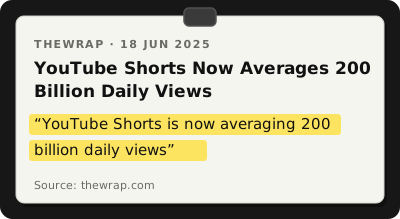
From TheWrap, 18 June 2025.
Partly design. The feed has no end and the next clip starts on its own. The mechanics are in why you can't stop scrolling.
The effect is measured. A review of 71 studies and 98,299 people by Nguyen and colleagues in Psychological Bulletin found higher short-form video use was "most consistently linked to poorer attention span and reduced inhibitory control". Inhibitory control is the ability to stop yourself. A Shorts feed asks that of you every few seconds.
From the same review:
- ·A moderate negative link with cognitive performance, a small but significant link with more anxiety, depression and stress, and a link with sleep disturbance.
- ·Studies that used addiction scales found stronger links than studies that measured time spent. How compulsively you watch matters more than the minutes.
- ·The authors' caution: most studies were cross-sectional, so cause is not established, and people who are already struggling may use more.
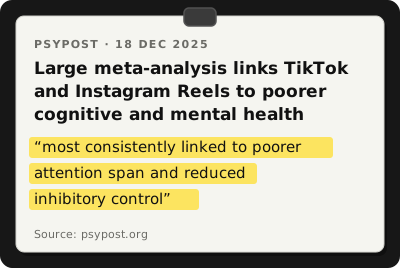
From PsyPost, 18 December 2025, reporting on Nguyen and colleagues in Psychological Bulletin.
So the goal is not fewer YouTube minutes. It is fewer sessions that start with one video and end in the Shorts tab.
How do I turn off YouTube Shorts?
YouTube now has a setting for this. The Shorts feed limit arrived in October 2025: a daily limit for the Shorts feed, after which "a dismissible prompt will interrupt you to inform you that the Shorts feed is paused for the day".
To set it, from YouTube Help:
- ·Open the YouTube app and tap the You tab.
- ·Tap Settings, then Time management.
- ·Tap Shorts feed limit and choose a time. Pick zero if you see it.
Zero is new. At launch the minimum was 15 minutes; since April 2026 the list includes "the option to set your Shorts feed limit to zero". At zero, the Shorts tab stops showing videos and you see a message that you have "reached your Shorts feed limit"; Shorts may also disappear from Home. It is rolling out in phases, so some users may still see individual Shorts or need to refresh. If your menu looks different, check under Settings, then General.
Can I block Shorts but keep YouTube?
Yes. The zero limit only touches the Shorts feed. Search, subscriptions, playlists, music and long videos still work.
The catch is one line on the help page. At the limit, the reminder comes with "an option to dismiss or ignore your set limit". For regular adult accounts it is a soft limit that can be bypassed; for supervised teen accounts the limit is strict and cannot be dismissed. For a parent of a teen, that is a real wall. For an adult, it is a speed bump.
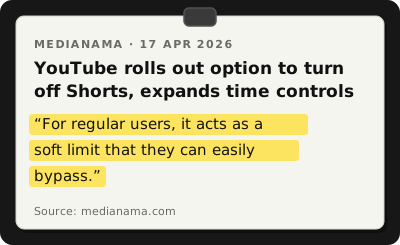
From MediaNama, 17 April 2026.
Two older settings work the same way:
- ·Take a break reminder. Profile picture, then Settings, then General, then "Remind me to take a break". It pauses your video until you dismiss it or resume playing.
- ·Bedtime reminder. Same area, turn on "Remind me when it's bedtime" and set a start and end time. When it appears you can dismiss it or tap "Remind Me Again" for 15 minutes. It is off by default for 18 and over, so switch it on yourself.
All three help. All three can be undone by the same tired thumb at 1 am.
How easy is each Shorts limit to get past?
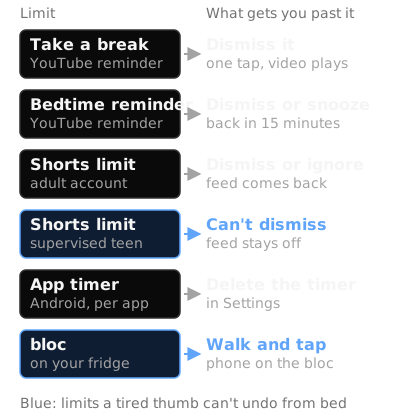
Source: YouTube Help, MediaNama, April 2026 and Google Android Help; bloc row is how bloc works.
What about limiting YouTube on my phone?
The next layer sits outside YouTube, where the app cannot offer a dismiss button.
On Android, open Settings, then Digital Wellbeing, then App timers, and tap Set timer next to YouTube. "When you run out of time, the app closes and its icon dims". Timers reset at midnight, and to reopen the app earlier you have to delete the timer. That is a trip into Settings, not a tap on a prompt. Enough friction for many evenings, though not all.
While you are there, set Bedtime mode with grayscale on. A Shorts feed in black and white is a much duller feed. Full walkthrough: how to reduce screen time on Android.
Two suggestions of our own, not from any study:
- ·Watch lectures and long videos on a laptop or TV, where the Shorts shelf is easier to scroll past.
- ·Move the YouTube icon off your home screen, so the thumb-to-Shorts reflex has to pause for a search.
A tonight, tomorrow, this week plan
This assumes YouTube has to stay installed. (Instagram instead? The Reels article has its own plan.)
Tonight (ten minutes)
- ·Set the Shorts feed limit to zero, or 15 minutes if zero has not reached your app yet.
- ·Turn on the bedtime reminder for your real sleep window, say 11 pm to 7 am.
- ·On Android, schedule Bedtime mode for the same window with grayscale on.
- ·Charge the phone outside the bedroom. The step most people skip.
Tomorrow
- ·Write down yesterday's YouTube minutes from Digital Wellbeing. That is your baseline.
- ·Decide which hours Shorts takes from you. Usually late evening, and a smaller block in the morning.
- ·Set an app timer for YouTube that covers the YouTube you need, not the YouTube you drift into. Two hours of lectures? Set two and a half.
- ·Move the icon off the home screen.
This week
- ·Each time you dismiss a reminder or delete the timer, make a mark in your notes app. No judgement, just a count.
- ·On day seven, compare your minutes with the baseline and look at the count.
- ·Low count: the settings are enough for you. Keep them.
- ·Dismissed most evenings: the setting is not the problem, the exit is. Add a physical block for the hours from day two.
The Doomscroll Timer shows how long a "quick scroll" really lasts. The Phone Addiction Quiz scores the habit.
Where bloc fits
bloc is the layer with no dismiss button: a small magnetic NFC device on your fridge, a free app for iPhone and Android, plus bloc for Chrome for websites.
In the app you choose the apps to block and when. They block on their own, on your schedule or from a session you start. For Shorts, that usually means YouTube from 10 pm to 7 am, plus study hours, and open in the afternoon for lectures.
Open YouTube in a blocked hour and you see a shield screen instead, with a limited peek if you need a quick look. To open it early, you walk to the fridge and tap your phone on the bloc. The tap only unblocks. Blocking runs by itself. A limit you can dismiss in bed rarely survives a tired evening. One that needs you to cross the house is a different decision.
Good to know:
- ·bloc blocks the whole YouTube app, not only the Shorts tab. Use the zero feed limit by day and bloc for the hours you do not need YouTube at all.
- ·bloc for Chrome can block youtube.com in the same hours, so the habit does not move to the laptop.
- ·Bloc Score shows how often you unblock early: the count you kept this week, done for you.
- ·Several phones can pair with one bloc, so parents and teens can share one fridge.
Sources
- ·TheWrap, YouTube Shorts averages 200 billion daily views (Neal Mohan at Cannes Lions), June 2025
- ·Deccan Herald, YouTube Shorts hit a trillion views in India, Neal Mohan at Brandcast 2024, August 2024
- ·Droid Life, YouTube will let you set a limit on how many Shorts you can watch, October 2025
- ·YouTube Help, "Set a Shorts feed limit"
- ·MediaNama, YouTube option to turn off Shorts expands time controls, April 2026
- ·YouTube Help, "Take a break reminder"
- ·YouTube Help, "Set a bedtime reminder"
- ·Google Android Help, Digital Wellbeing app timers and Bedtime mode
- ·PsyPost, on Nguyen and colleagues, "Feeds, Feelings, and Focus: A Systematic Review and Meta-Analysis Examining the Cognitive and Mental Health Correlates of Short-Form Video Use", Psychological Bulletin, December 2025
bloc sits on your fridge. YouTube blocks on a schedule. Unblocking takes a walk. See how bloc works →
bloc is our product. We make and sell it, so read anything this article says about bloc as the maker's view. Every other claim links to its source.
Spot a mistake? Email support@letsbloc.com. We check it, fix it and update the date above.
Founder of bloc. IIT Kharagpur. Formerly a senior product analyst at BharatPe. Builds bloc full time from Bir, Himachal.
Free tools from bloc
Frequently asked questions
How do I turn off YouTube Shorts?
In the YouTube app, go to the You tab, then Settings, then Time management, then Shorts feed limit, and pick zero. The Shorts tab stops showing videos and you see a message that you have reached your Shorts feed limit. The zero option started rolling out in phases in April 2026, so if you only see 15 minutes or more, your app has not got it yet.
Can I block Shorts but keep YouTube?
Yes. The Shorts feed limit only affects the Shorts feed, so search, subscriptions, long videos and music keep working. The catch is that on a regular adult account the limit is soft: when you hit it, YouTube shows a reminder with an option to dismiss or ignore it. Only supervised teen accounts get a limit that cannot be dismissed.
Why are YouTube Shorts so addictive?
The feed never ends and the next clip starts on its own. Shorts averages 200 billion views a day, and a review of 71 studies and 98,299 people found higher short-form video use was most consistently linked to poorer attention span and reduced inhibitory control, which is the ability to stop yourself. Most of those studies are snapshots, so cause is not proven, but the pattern is clear.
Does the YouTube take a break reminder work?
It helps a little. The reminder pauses your video at the interval you choose until you dismiss it or resume playing, so it interrupts autopilot. It does not stop you. The same goes for the bedtime reminder, which you can dismiss or snooze for 15 minutes. Treat both as a nudge, then add a phone level timer or a physical block for the hours you actually lose.
How do I stop watching Shorts at night?
Set YouTube's bedtime reminder for your sleep window, turn on Android's Bedtime mode with grayscale so the feed loses its colour, and set a Digital Wellbeing app timer for YouTube. If you keep deleting the timer, block the whole YouTube app on a schedule with a bloc, so unblocking means a walk to the fridge instead of a tap.
Ready to stop doomscrolling for good?
Try bloc — the device that actually keeps you off your phone
One-time purchase · Free shipping across India · 30 day replacement guarantee
Order bloc, from ₹1,699