In this article8 sections
Opal is a screen time app. The block lives inside your phone, and whether you can end it early depends on a setting you choose. bloc (by Letsbloc) is a small magnetic NFC device on your fridge, with a free app for iPhone and Android. Apps block on a schedule, and to unblock early you walk to the fridge and tap your phone on it.
Opal is free to start, with a Pro subscription for its strictest mode. bloc is ₹1,699, pay once, and ships across India.
Disclosure: this comparison is written by the team that makes bloc. We checked Opal's details in October 2026. Prices and features change, so check Opal's App Store listing before you decide.
In 30 seconds
- ·Opal: well rated app, iPhone and Android. Free tier covers stats, daily limits and a few scheduled sessions.
- ·Opal's no-cancel mode (Deep Focus) needs Pro. About ₹919 to ₹1,149 a year in India.
- ·bloc: apps block on a schedule. Unblocking early means a walk to the fridge. ₹1,699 once, no subscription.
- ·Use both if you want Opal's stats by day and a physical block for the hours that matter.
It is 11 pm, a session is running, and you want Instagram back. With Opal, what happens next depends on a setting you picked that afternoon. With bloc, it is a walk to the kitchen.
What is Opal?
Opal is a popular screen time app by Opal OS. On the App Store in India it is listed as "Opal: Screen Time Control", marked "Free · In-App Purchases", and rated 4.7 from about 11,000 ratings. On iPhone it uses Apple's Screen Time API "in order to monitor and block apps you use": you pick the apps, set a session or a schedule, and Opal shows a block screen when you open one.
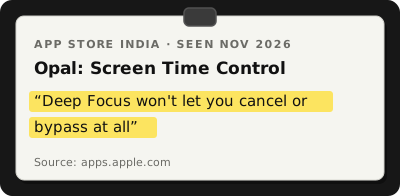
From Opal: Screen Time Control on the App Store (India), listing as seen on 3 November 2026.
Two features from the listing matter most here:
- ·Focus Difficulty. "Make it hard, or make it a bit easier. Deep Focus won't let you cancel or bypass at all."
- ·Breaks. "Choose the app you want to use, write your intention, and set a timer."
The release notes also mention a block on uninstalling the app, waiting rooms, Vacation Mode and an emergency pass.
Is Opal free?
Partly. Opal's help centre says the free version gives you "three recurring Focus Sessions, unlimited Focus Sessions that you can initiate immediately", a Time Limit and Open Limit, Focus Reports, and your day's Focus Score.
Pro adds unlimited recurring sessions, an Allow List, Focus Score history, and the mode where "you're unable to cancel or take a break", on iPhone, Mac and Android. So the strict mode is a subscription.
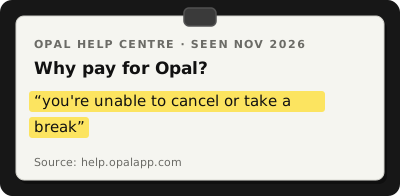
From Opal help centre, "Why pay for Opal?", undated page as seen on 3 November 2026.
How much does Opal Pro cost in India?
When we checked the App Store listing in October 2026: yearly plans at ₹919 and ₹1,149, a monthly plan at ₹230, and weekly plans at ₹59 and ₹115. Plan names repeat at different prices, so check what you are actually offered. We saw no lifetime plan in the Indian list.
In the US, Autonomous and Timily list Pro at $99.99 a year, $19.99 a month, or $399 lifetime. Both sell their own screen time products, so read their reviews with that in mind. Autonomous also says students can apply for up to 50% off.
Does Opal work on Android?
Yes. Opal is on Google Play as "Opal Screen Time Limit & Timer" by "Opal: The Focus Company". On Android it uses the AccessibilityService API, the usual route for Android blockers. The two versions are not identical: the Autonomous review says "the iPhone version is the stronger one".
How do you end a block early?
This is where Opal and bloc differ most.
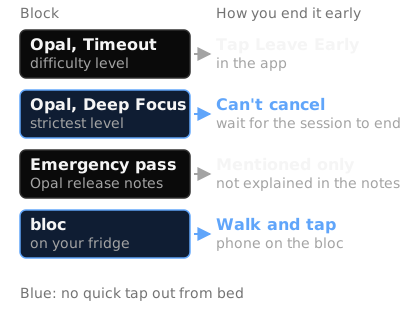
Source: Opal on the App Store (India) and Opal Community; bloc row is how bloc works.
With Opal, it depends on the difficulty you chose. In a February 2025 post on the Opal Community, a user describes Timeout difficulty as letting you "Leave Early", and Deep Focus as not. The App Store listing puts it plainly: in Deep Focus "you can't bypass or cancel". The emergency pass is mentioned but not explained.
With bloc, there is one answer for every block. Apps block on their own, on your schedule or from a session you start in the app. Open a blocked app and you see a shield screen with a limited peek. To unblock early, you walk to the fridge and tap your phone on the bloc. The tap only unblocks. The blocking runs by itself.
Opal's exit is a setting: no exit, or an easy one. bloc's exit is a place: always there, and it always costs a walk. Stopping is easier standing in the kitchen than lying in bed with your thumb already moving. We wrote about why in why willpower isn't enough to stop doomscrolling.
Can you get around Opal?
Any app that blocks other apps lives inside the phone it is blocking. Autonomous, which sells its own NFC blocker, says "a determined user can work around it through iOS settings. Opal makes that harder, not impossible." bloc's app lives on your phone too. The difference is that the normal way to unblock is physical: you decide whether to get up, not whether to open Settings.
bloc vs Opal side by side
| bloc | Opal | |
|---|---|---|
| What it is | Magnetic NFC device on your fridge, plus a free app | Screen time app |
| Price | ₹1,699, pay once | Free tier; India App Store listed ₹919 to ₹1,149 a year or ₹230 a month (October 2026) |
| Subscription | None | Needed for unlimited recurring sessions, Allow List and the no-cancel mode |
| How apps get blocked | On a schedule, or from a session started in the app | Scheduled or on demand sessions, Time Limit, Open Limit |
| How you end a block early | Walk to the fridge and tap your phone on the bloc | Timeout: tap Leave Early. Deep Focus: cannot cancel. Emergency pass mentioned in release notes |
| iPhone | iOS 16.2 or later | iOS 18.0 or later, using Apple's Screen Time API |
| Android | Phones with NFC | Yes, using the AccessibilityService API |
| Desktop | bloc for Chrome blocks websites | Mac app (Pro features included) |
| Physical device | Yes, on the fridge | No |
| Where to buy in India | Ships across India | App Store and Google Play |
Can you use Opal and bloc together?
Yes, and for many people that is the sensible setup.
- ·Opal's free tier shows where your time goes and sets a daily Time Limit on Instagram or an Open Limit on YouTube.
- ·bloc takes the two or three hours you keep losing, usually late evening and maybe a study block. Those apps block on their own at the set time, and the way back in is the fridge.
Which should you use?
Use Opal if you want stats and daily limits on the phone, you are fine with the free tier or the Pro subscription, and you want a strict mode for the sessions that need it.
Use bloc if you have tried app based limits and found yourself dismissing them, you want to pay once, and you want the block to run on a schedule without deciding each time. Several phones in a home can pair with one bloc, and Bloc Score tracks how your blocks are going.
Use both if you want Opal's limits for the day and a physical block for the hours that matter most.
The test is the same either way: what happens at 11 pm when you want the app back? If the answer is "tap a button", the limit is a suggestion. If it is "wait for the timer" or "walk to the kitchen", the limit holds.
For more options in India, see best phone addiction blockers in India (2026). To work out which apps to block first, try the App Toxicity Ranker. Or see how bloc works.
Sources
- ·Opal: Screen Time Control on the App Store (India)
- ·Opal help centre, "Why pay for Opal?"
- ·Opal Community, "Break-only difficulty level / remove Leave Early option", February 2025
- ·Autonomous, Opal app review (third party, sells its own NFC blocker)
- ·Timily, Opal app review (third party, sells its own parental control app)
- ·Similarweb, Opal Screen Time Limit & Timer on Google Play
bloc sits on your fridge. Apps block on a schedule. Unblocking takes a walk. Starts at ₹1,699. See bloc →
bloc is our product. We make and sell it, so read anything this article says about bloc as the maker's view. Every other claim links to its source.
Spot a mistake? Email support@letsbloc.com. We check it, fix it and update the date above.
Founder of bloc. IIT Kharagpur. Formerly a senior product analyst at BharatPe. Builds bloc full time from Bir, Himachal.
Free tools from bloc
Frequently asked questions
Is Opal free?
Partly. The free tier gives you three recurring Focus Sessions, unlimited sessions you start right away, Time Limit and Open Limit, and Focus Reports. The strictest mode, where you cannot cancel or take a break, needs Opal Pro, listed in India at ₹919 to ₹1,149 a year or ₹230 a month in October 2026.
Does Opal work on Android?
Yes. Opal is on Google Play as Opal Screen Time Limit & Timer. On Android it uses the AccessibilityService API rather than Apple's Screen Time API, and Pro works across its iPhone, Mac and Android apps.
Can you end an Opal block early?
It depends on the difficulty you pick. On Timeout difficulty you can tap Leave Early. On Deep Focus, Opal says you cannot bypass or cancel until the session ends. Opal's release notes also mention an emergency pass, without explaining what it does.
What is the difference between Opal and bloc?
Opal is an app that blocks apps from inside your phone, with its strictest mode behind a subscription. bloc is a ₹1,699 magnetic NFC device on your fridge plus a free app. Apps block on a schedule, and unblocking early means walking to the fridge and tapping your phone on the bloc. Pay once.
Can I use Opal and bloc together?
Yes. Opal's free tier is good for stats and daily limits. bloc can cover the hours you keep losing, like late evenings or study time, where unblocking needs a walk instead of a tap.
Ready to stop doomscrolling for good?
Try bloc — the device that actually keeps you off your phone
One-time purchase · Free shipping across India · 30 day replacement guarantee
Order bloc, from ₹1,699